
Centralize Data with the Onna + Logikcull Integration
Onna + Logikcull gives you an end-to-end workflow for modern eDiscovery. Collect targeted data from cloud-based apps with Onna, then dive straight into review and production in Logikcull. Avoid IT bottlenecks—and inflated review costs from over-collection.

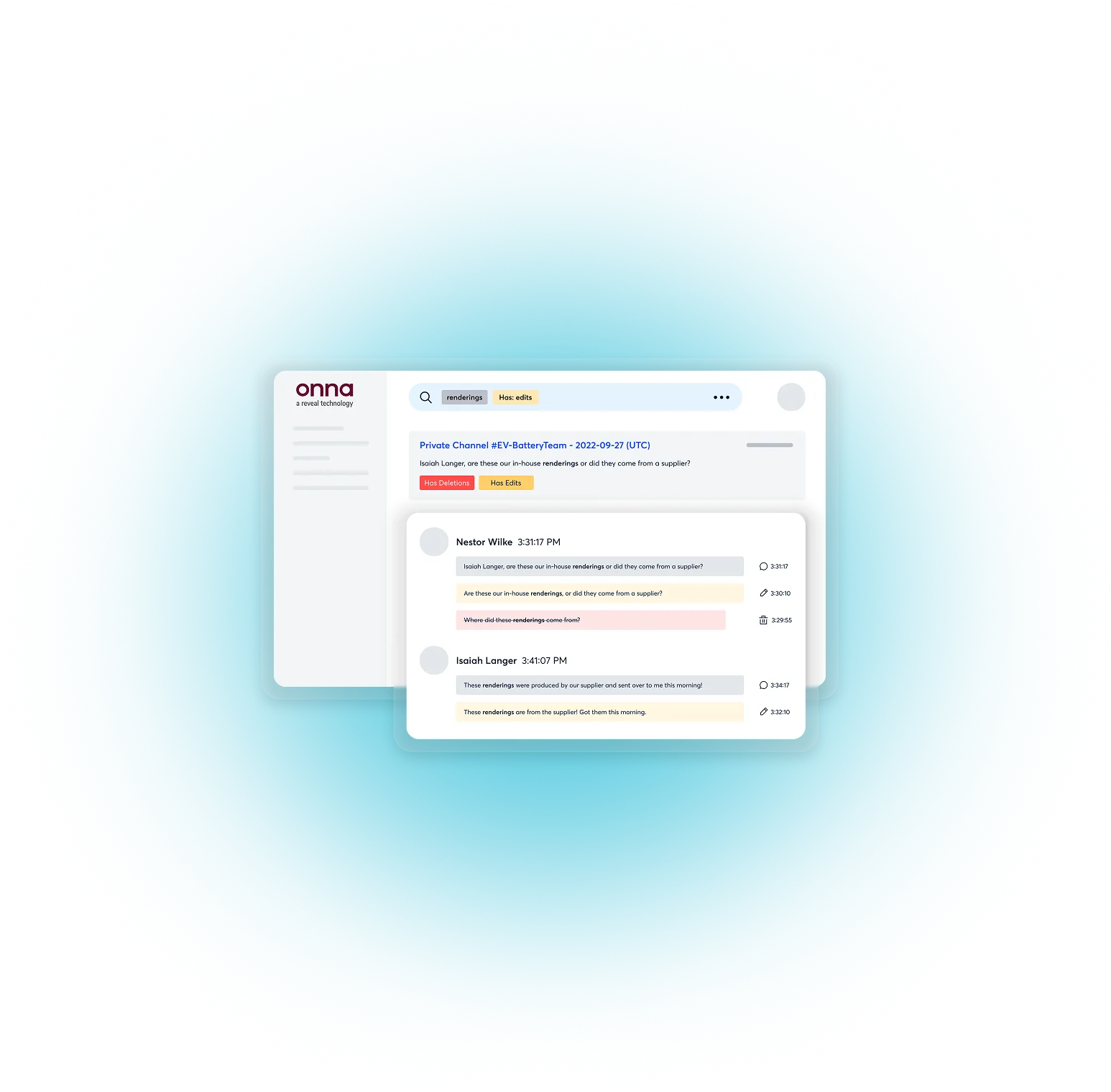
Connect Directly to the Evidence
Logikcull connects directly to Google Vault, Microsoft 365, Slack, Box and other common sources of evidence so your data flows straight into the platform, ready to work

Direct Cloud Integrations: Connect once to Google Vault, MS365, Slack, and Box with no downloading, reuploading or wasted time.

Capture The Details: Automatically dedupe, extract metadata, thread emails and group families to surface your most relevant evidence.

Instant Organization: Your data auto-dedupes and organizes by sender, domain, date, and more upon ingestion, surfacing hot docs in clicks instead of hours.

Zero IT Dependency: Once IT grants access, you're autonomous: configure collections, set parameters, and pull data on demand without ticketing.

Surfaced smoking gun messages in Slack that another vendor missed, driving a multi-million dollar settlement.
From Collection to Review in a Click
Use Onna to narrowly collect from 29+ sources, including ChatGPT, Zoom, Salesforce, and Slack, with a no-code connector. Then send that data directly into Logikcull ready to search, review, and produce.

Collect Smarter
Conduct targeted data collection from Slack, Google Workspace, Atlassian, and more collaboration apps in Onna.

Reduce Review Volume
Narrowly collecting with Onna's pinpoint precision reduces review volume in Logikcull, or any other review tool.

Review Faster
Send collections directly into Logikcull without reprocessing to search and review your data.

Maintain Defensibility
Preserve metadata, relationships, and chain of custody from source through production.

Keep Work In‑House
Handle collections, early case assessment, and review internally with less reliance on outside counsel or service providers.
Onna Connectors
Onna’s no-code connectors give you a single view and collection ability into all your collaboration and content apps. Collect, organize, and manage it all with a workflow that’s simple, fast, and scalable.




















Why Teams Pair Onna with Logikcull
Most discovery delays happen before review even begins, when you need IT to collect
from sources of data one by one. Pairing Onna with Logikcull provides a seamless data pipeline from collection to review, and a single pane of glass into all your sources of evidence.
Now you...
With Onna, you can...
How it works
Connect your data sources in Onna
Authenticate once using secure, API‑based connectors.
Target what matters
Collect by custodian, user, date range, channel, file type, or keyword.
Preserve and process
Get forensically sound copies and data in a review‑ready format.
Export directly to Logikcull
Push collections into Logikcull with a single click. No reprocessing required.
Review and produce in Logikcull
Filter, search, tag, review, and produce data immediately.
Frequently Asked Quesions
All your questions answered
Onna is a dedicated data collection and management platform that connects to 29+ workplace applications, including Slack, Google Workspace, Microsoft 365, Salesforce, Zoom, Atlassian, ChatGPT, GitHub, and more, via no-code API connectors. When paired with Logikcull, Onna handles the collection side of the discovery workflow: legal teams use Onna to precisely target and extract data from collaboration and cloud platforms, then push those collections directly into Logikcull for review and production with a single click, with no reprocessing required. Together, Onna and Logikcull provide an end-to-end pipeline from modern data source to court-ready production.
Onna's no-code connectors support 29+ workplace applications, including: Slack, Microsoft 365 (Exchange, Teams, SharePoint, OneDrive, Outlook), Google Workspace (Google Vault, Gmail, Google Drive), Box, Dropbox, Salesforce, Zoom, Atlassian (Jira, Confluence), Zendesk, Miro, Clio, GitHub, OpenAI/ChatGPT, Quip, and more. All connectors use secure, API-based authentication. Legal teams connect once, then pull targeted collections on demand without repeating the setup for each matter.
The Onna-to-Logikcull workflow is a five-step pipeline designed to eliminate every manual handoff between collection and review:
1. Connect — Authenticate to data sources in Onna once using secure API connectors.
2. Target — Scope collections by custodian, date range, channel, file type, or keyword.
3. Preserve and process — Onna creates forensically sound copies with metadata and context intact.
4. Export to Logikcull — Push the collection into Logikcull with a single click. No reprocessing or re-uploading required.
5. Review and produce — Filter, search, tag, and produce directly in Logikcull immediately.
The entire pipeline, from source connection to review-ready data, can be completed without IT involvement, outside vendors, or manual file transfers.
No. Onna uses no-code API connectors so legal teams authenticate to data sources once through a standard OAuth or API key flow (which typically requires a one-time IT grant of access), and from that point they are fully autonomous. Legal teams can configure collections, set parameters, target custodians, and pull data on demand without submitting IT tickets for each new matter.
Over-collection occurs when legal teams collect far more data than is actually relevant to a matter, typically because they lack the tools to be precise at the source, and default to pulling everything just to be safe. The cost multiplier is severe: every gigabyte over-collected must be processed, hosted, reviewed, and potentially produced. Processing and review fees scale with volume, so collecting 10x more data than needed can increase discovery costs by an order of magnitude. Over-collection also creates privilege risk. The more irrelevant data that flows into review, the greater the chance of inadvertently producing protected documents. Onna addresses this at the source by enabling pinpoint collection, targeting specific custodians, date ranges, channels, and keywords before data ever enters the review pipeline.
eDiscovery review is typically billed per gigabyte or per document, meaning the single most effective way to reduce discovery spend is to reduce the volume that enters review in the first place. Onna enables legal teams to collect with pinpoint precision: selecting only the custodians involved, only the relevant date range, only the relevant channels or folders, and only the relevant file types. This targeted approach means only genuinely relevant data flows into Logikcull for review, dramatically cutting processing costs, hosting fees, and attorney review time. Teams that previously over-collected entire mailboxes or workspace exports can instead pull a fraction of the data with the same evidentiary coverage.
Ongoing preservation (also called continuous preservation) means automatically capturing changes to data over time, not just taking a one-time snapshot at collection, but monitoring connected sources and preserving new or modified content as the matter progresses. This is particularly important for active investigations and long-running litigation where custodians continue to create and modify relevant documents after the initial hold is issued. Onna supports ongoing preservation: once a connection is established to a data source, any changes to monitored files and folders are updated on the Onna side automatically.
Chain of custody in eDiscovery requires being able to prove that data was not altered between its source and its production. The Onna + Logikcull integration preserves chain of custody across the entire pipeline: Onna creates forensically sound copies at collection, preserving all metadata and document relationships at the source. When collections are pushed to Logikcull, data is transferred without reprocessing, eliminating the metadata gaps that can occur when data is exported, reformatted, and re-imported manually. Logikcull then maintains a full audit trail through review and production. The result is an unbroken, documented evidence chain from the original source through to court-ready output.
Collaboration platforms like Slack, Teams, and Zoom have retention policies and auto-deletion settings that can destroy potentially relevant data if a preservation hold is not established quickly. Manual collection workflows like submitting IT tickets, waiting for exports, and transferring files create dangerous time gaps between when litigation is anticipated and when data is actually secured. Onna closes this gap by enabling legal teams to connect to sources and trigger preservation immediately, without waiting for IT or vendor involvement.
Most discovery delays and cost overruns happen before review even begins, in the collection phase, where legal teams depend on IT, outside counsel, or eDiscovery vendors to access and extract data from cloud platforms. Onna eliminates this dependency by giving legal teams self-service collection capability across 29+ platforms, combined with Logikcull's self-service review and production. The combined workflow means corporate legal departments can handle collections, early case assessment, full review, and production entirely in-house, reducing outside counsel costs, vendor fees, and turnaround time simultaneously. Teams that previously waited days or weeks for vendor collections can now move from litigation trigger to review-ready data on the same day.
With Onna, we can directly connect to specific folders or custodians and collect the data in an automated way. With ongoing preservation, any changes to those files are updated on the Onna side."


Margaux Savee
Senior Director of Litigation, Dropbox
We wanted to have confidence that the data we're preserving and storing is not at risk of accidental deletion or spoliation... That's where we're seeing the value — ensuring we're not going to get in trouble when it comes to any of this data."


Dylan Tonti
Litigation Operations Manager, Instacart
To the extent that it allows the legal team to be self-served. Yeah, I mean, I think that's where we're at with the tool."

Jessica Amyett
Litigation & eDiscovery Paralegal, Dropbox
Learning With Logikcull
Browse our latest resources for innovative legal teams like yours



%20(1).png)
See the Workflow in Action
Got data in Slack, Google Workspace, Atlassian, and other collaboration apps? Get your discovery workflow there too.